Virtual Staging in California: Cost, Rules, and When It’s Worth It
Virtual staging costs $35 per photo with us for the first 5 photos and $25 after that, and it is legal in California as long as you disclose it. Under AB 723, a digitally altered listing photo must carry a disclosure and the unaltered original must be available to buyers. It's worth it on vacant and partly furnished homes, and a mistake when it's used to hide a problem.
October 3, 20268 min read
By Tom Van Vechten · Updated
What is virtual staging?
Virtual staging adds furniture, rugs, and decor to a photo of an empty room. Nothing is moved into the house. A designer works on the photograph after the shoot.
It's different from two things it gets confused with. Virtual decluttering removes items from a photo of an occupied room. Virtual renovation changes the room itself, like new floors or a different wall color. All three are digital alterations, and California treats all three the same way for disclosure.
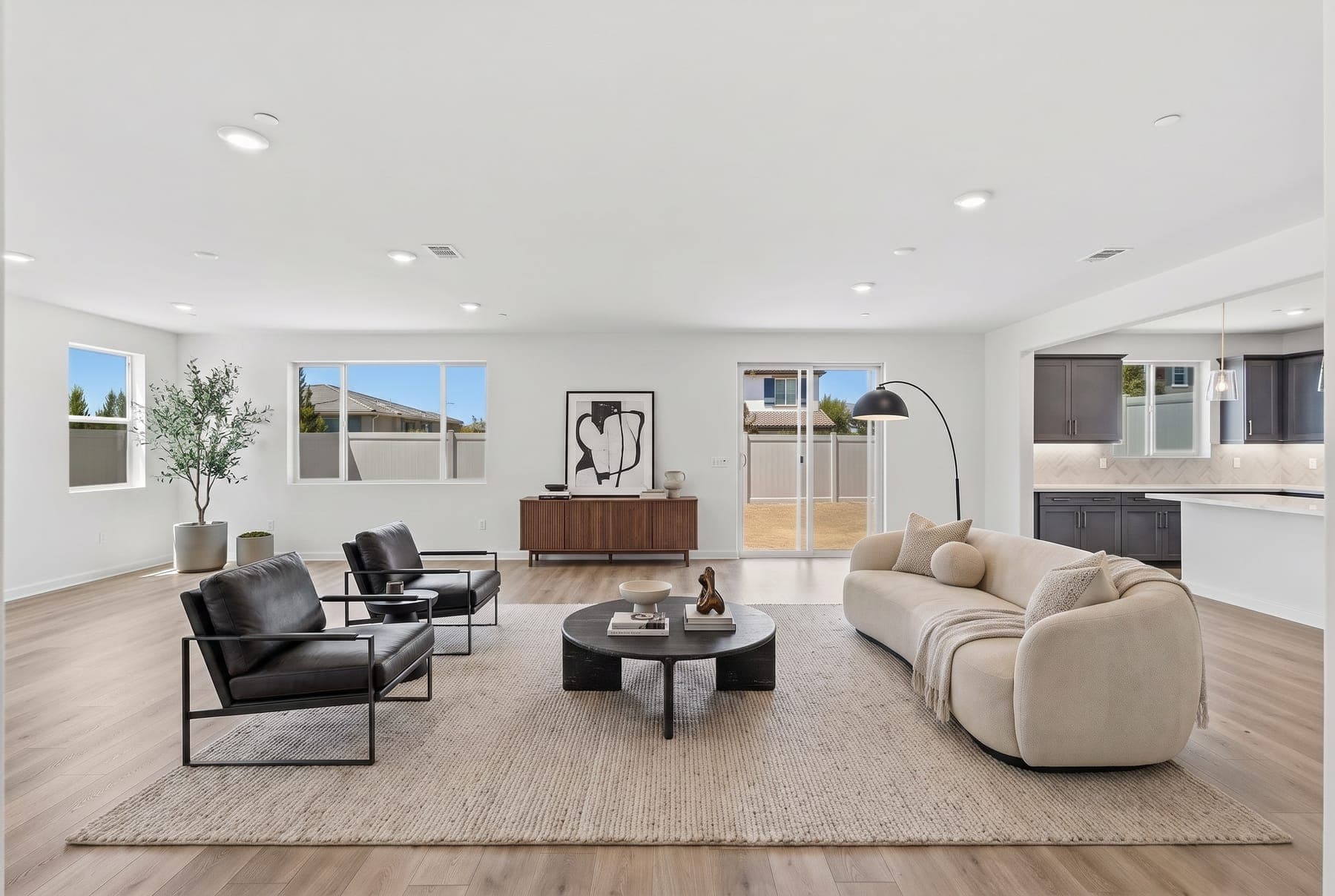
Before: an empty living room from one of our Escondido shoots.
After: the same photo, virtually staged. Walls, floors, windows, and the view are unchanged.
How much does virtual staging cost?
We charge $35 per photo for the first 5 photos and $25 for each one after. Staging three key rooms, which is what most vacant listings need, comes to a little over a hundred dollars. You choose a style, and it's delivered with the rest of your photos. Current prices are on the pricing page.
Physical staging is priced very differently: per home, usually with a monthly rental, plus delivery and removal. Get a quote from a local stager for a real comparison. Our guide to virtual vs. physical staging covers when the physical version is still the better call.
What does California law require?
Assembly Bill 723 took effect on January 1, 2026. It applies to real estate advertising that uses digitally altered images. In plain terms, if a listing photo has been altered to add, remove, or change things in the scene, you have to:
Disclose it. State clearly that the image has been digitally altered.
Make the original available. Buyers must be able to see the unaltered version of the photo.
Virtual staging is squarely covered, because it adds things that aren't there. Routine photo correction, like adjusting brightness, color, or straightening the frame, is not the kind of change the law is aimed at.
Your MLS has its own rules on top of the state law, including how staged photos must be labeled. Check your MLS's current policy, and read our AB 723 guide and the MLS compliance playbook for altered photos for the detail.
This is a practical summary, not legal advice. For how the law applies to a specific listing, ask your broker or an attorney.
How do I disclose virtual staging correctly?
Label the photo. Put "Virtually staged" on the image or in its caption, following your MLS format.
Keep the original in the set. Place the empty-room version right after the staged one, so buyers see both.
Say it in the remarks. One line in the listing description removes any doubt.
Keep your files. Hold on to the originals and the staged versions for your transaction records.
We deliver every staged photo alongside its original, so you have both without asking.
What can’t I change in a staged photo?
Disclosure doesn't make every edit acceptable. Staging should show what a buyer could do with the room, not a different room. Stay away from:
Removing or hiding damage, stains, cracks, or wear
Changing floors, counters, cabinets, or fixtures the buyer will not get
Altering the view, the neighbors, or power lines out the window
Making a room look larger by using undersized furniture
Adding features that are not there, like a fireplace or built-ins
The test is simple: when the buyer walks in, the room should be the same room, just empty.
When is virtual staging worth it?
Vacant homes. This is the clear case. Empty rooms look smaller in photos and give buyers no sense of scale. In the National Association of REALTORS® 2025 Profile of Home Staging, 83% of buyers' agents said staging made it easier for a buyer to visualize the property as a future home. That report is about staging in general, not virtual staging specifically, but the reason carries over: buyers need help seeing how a room is used.
Partly furnished homes. A seller who has already moved most of their things leaves rooms that look abandoned. Staging the empty ones makes the set consistent.
Odd rooms. A bonus room, a loft, or a large landing reads as wasted space until you show it as an office or a playroom.
Stage the rooms buyers care about most first: the living room, the primary bedroom, then the kitchen or dining area.
When should I skip it?
The home is furnished and shows well. Photograph it as it is.
The furniture is the problem. Decluttering or having the seller remove pieces is more honest than staging over them.
The room has a flaw you are hoping to distract from. Buyers will see it at the showing, and now they trust the listing less.
A luxury listing where buyers expect the real thing. At the top of the market, physical staging often still wins.
Frequently asked questions
Is virtual staging legal in California?
Yes. Under AB 723, effective January 1, 2026, a digitally altered listing image must be disclosed as altered and the unaltered original must be available to buyers.
Do I have to label virtually staged photos?
Yes. Label the photo as virtually staged, include the unstaged original in the listing, and follow your MLS’s labeling rules.
How much does virtual staging cost?
With Turnkey Media, $35 per photo for the first 5 photos and $25 per photo after that.
Can buyers tell a photo is virtually staged?
Good staging looks realistic, which is exactly why it has to be disclosed. Buyers should never find out at the showing.
How many rooms should I stage?
Usually three to five: the living room, the primary bedroom, and the kitchen or dining area first. Staging every room is rarely needed.
Ready when your listing is
Book your shoot online in a few minutes. Photos are delivered the next day.